Paste the guest list.
Get a file a printer
can use.
Tablemark splits a pasted list into one card per person, flags the names that need a decision, and holds the export until you have confirmed each of them. Every file leaves with its bleed, safe margin, resolution and font licences attached.
The free plan previews cards with a watermark and does not export files. Paid plans are USD 19 and USD 79 per month.
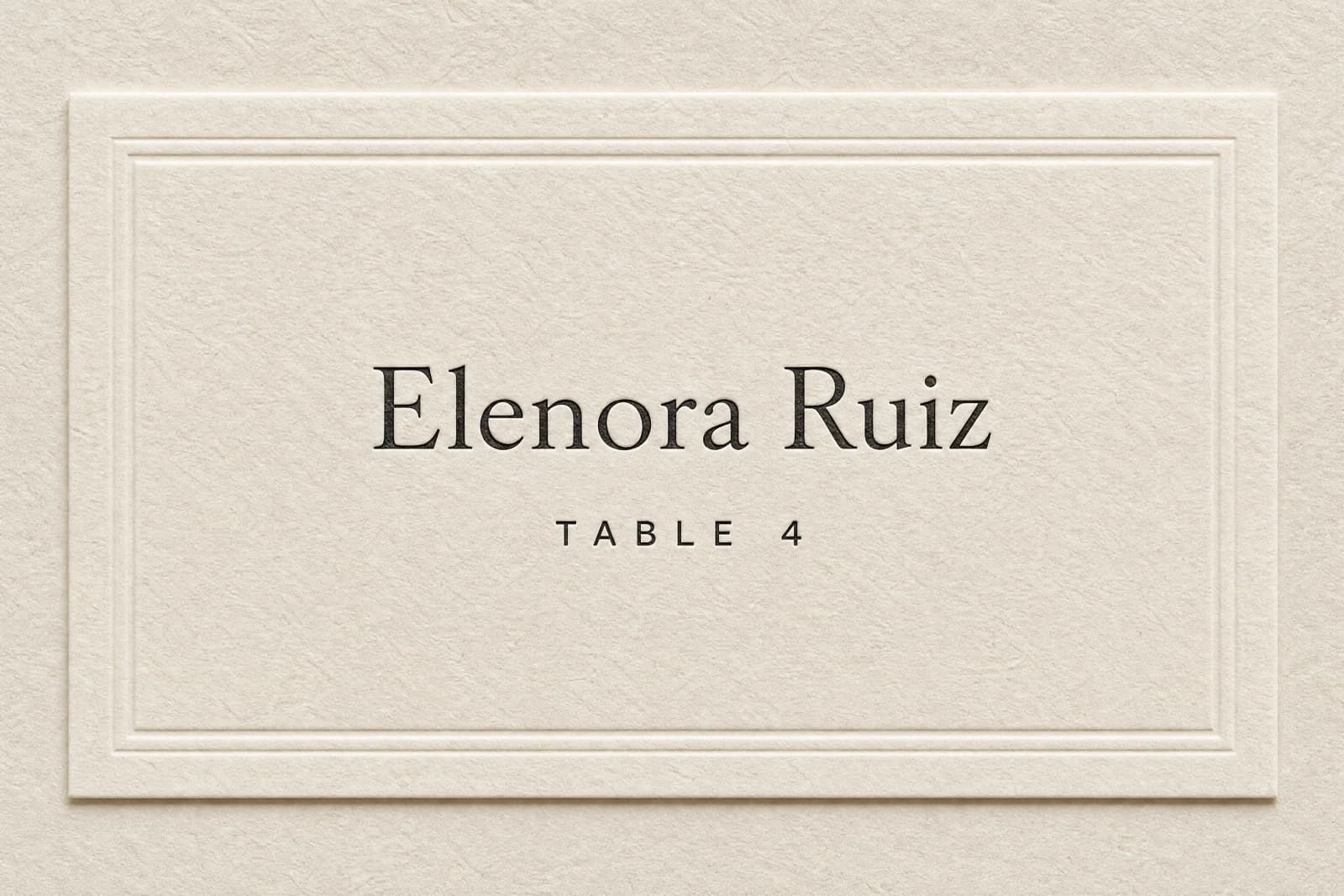
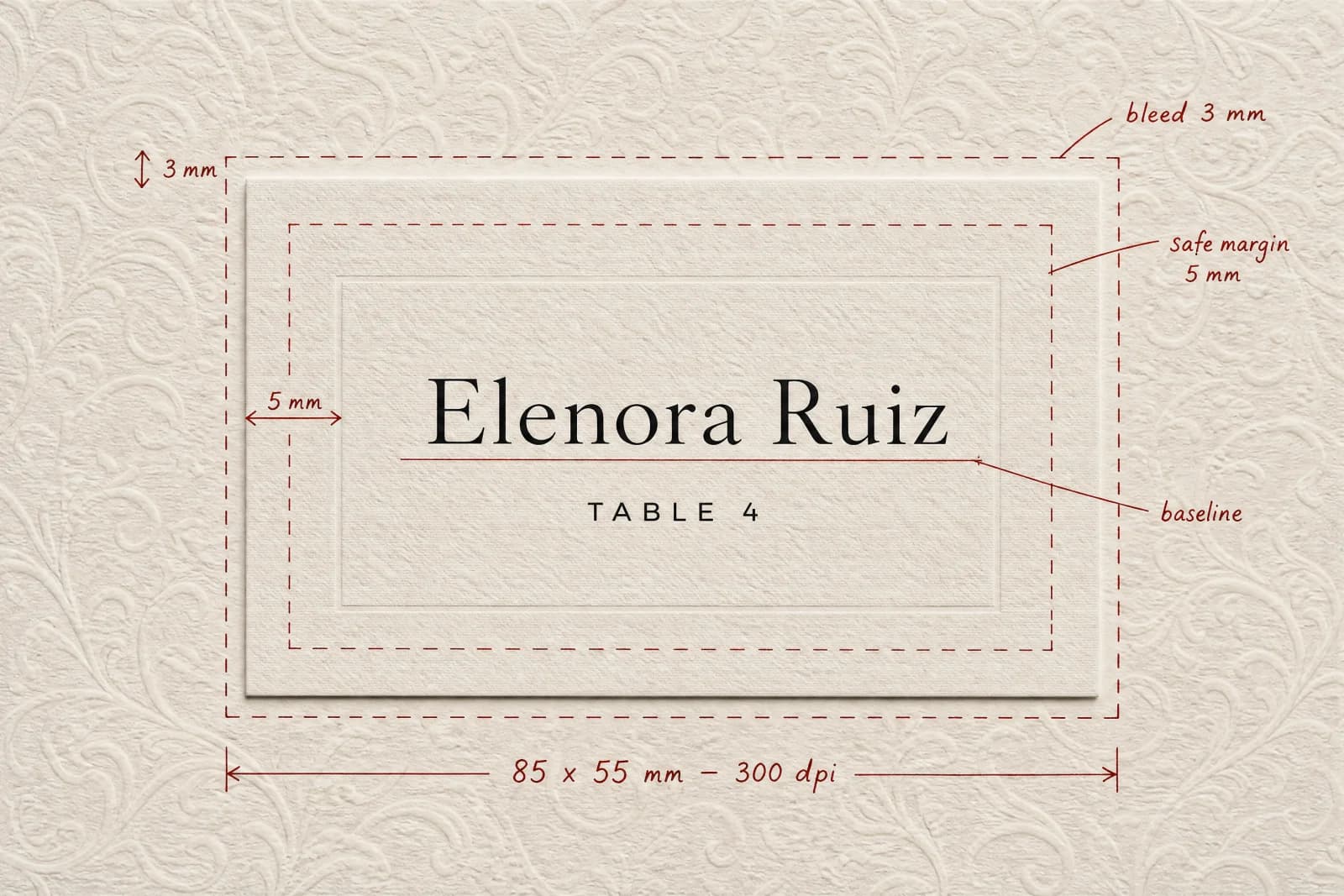
Two states of one card. What you download is the second one — a print file, not a mock-up of a print file.
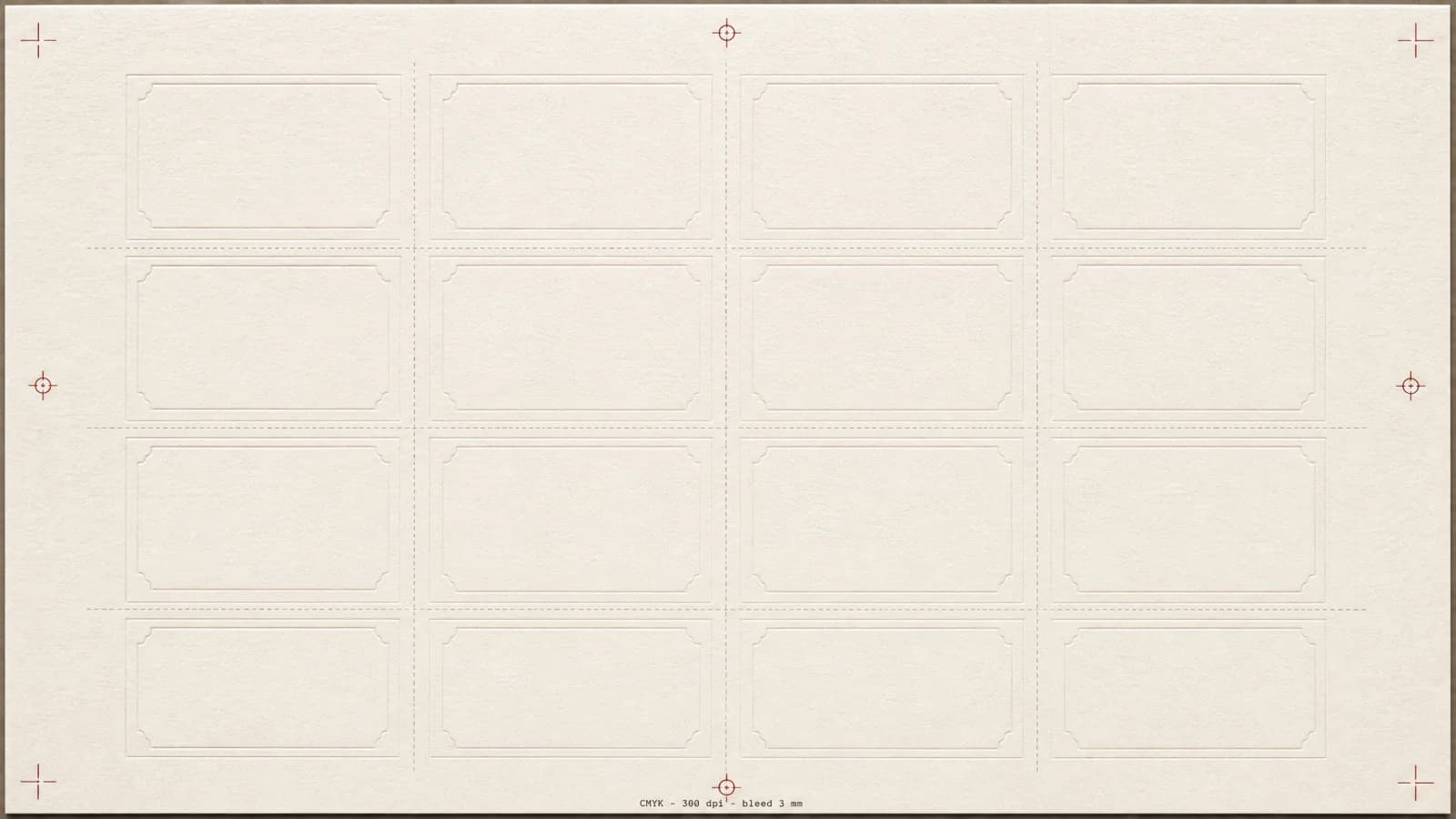
- cards-cmyk.pdf128 cards, 16 up, crop marks
- cards-rgb.pdfScreen proof of the same file
- table-numbers.pdfSame type system, 100 × 150 mm
- font-licences.txtEvery typeface and its licence
confirmed spelling
- Trim size
- 85 × 55 mm
- Bleed
- 3 mm on every edge
- Safe margin
- 5 mm
- Resolution
- 300 dpi
- Colour
- RGB and CMYK preview
- Fonts
- Licence list in every export
The hard part is not making the card look good.
A hundred and twenty names, some with accents, some with the surname first, some that arrived as “the Harpers” and one that says “Mum + guest”. Then table numbers that have to agree with the seating plan, and a file the printer will not send back.
That is a clerical problem with a deadline attached, not a creative one. So this tool is built around checking, flagging and specification — and it says out loud when it cannot work something out.
Five steps, and the fourth one cannot be skipped.
Each step works on its own. Together they run from a pasted list to a folder of print files. Step four sits between you and the export, on purpose.
- 01
Paste the list. It comes back as one card per person.
A spreadsheet column, an email thread, a note on your phone — whatever shape it is in. Rows holding two people are split, titles are kept where they were given, and anything that cannot be resolved from the text alone is flagged rather than guessed at.
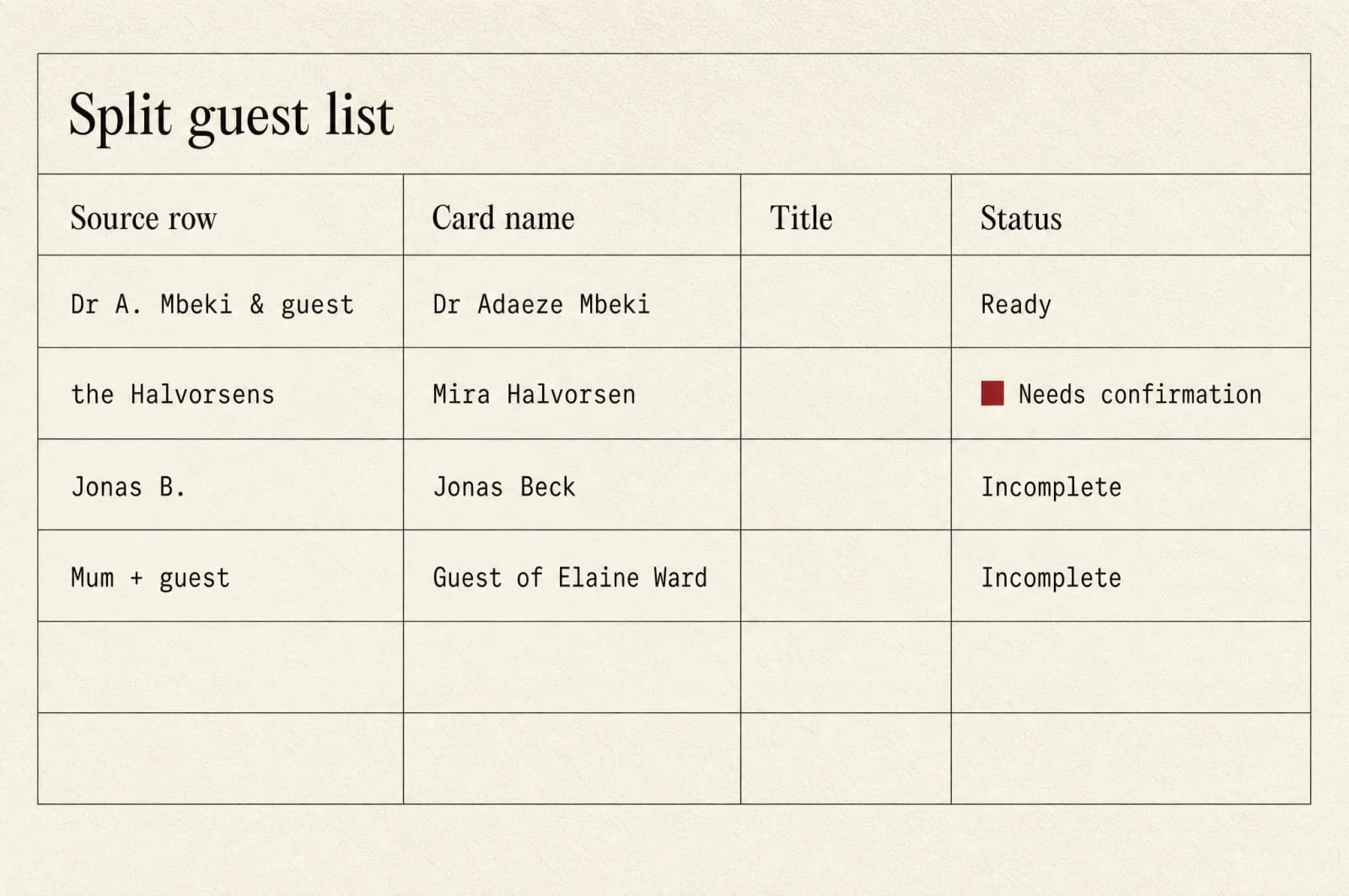
The source row stays visible next to the card name, so you can check the split rather than trust it. - Couples on one line split into two cards
- Plus-ones without a name stay marked incomplete
- Accents, particles and surname order raise a flag
- Every row keeps its original text next to the card name
- 02
Tables in, arrangement out — including what it could not do.
Step 02 opens once you have seen the one before it — the same order the tool works in.
- 03
Layouts that arrive with their print specification attached.
Step 03 opens once you have seen the one before it — the same order the tool works in.
- 04
Every name confirmed one at a time. There is no button for all of them.
Step 04 opens once you have seen the one before it — the same order the tool works in.
- 05
A silent floor plan loop for the screen at the door.
Step 05 opens once you have seen the one before it — the same order the tool works in.
Four things this tool does not promise.
Every one of these is a place where software of this kind is usually sold on a guarantee it cannot keep. We would rather be specific about the edges.
- Spelling
We flag names that commonly get set wrong — accented characters, surnames that come first, double-barrelled names — and ask you to confirm each one. Only the person themselves knows how they write their name.
- Titles and naming conventions
Where a title or name order is uncertain we show the common conventions side by side, without ranking them, and give you a sentence you can send to ask. We do not tell you which one is correct.
- Printed colour and cutting
Screens are RGB, presses are CMYK, and paper stock changes both. We show the two previews together, put 3 mm of bleed on every edge, and recommend a proof before the run. Trimming accuracy belongs to your printer.
- Track record
MABUREDE AI LTD was incorporated on 14 April 2026. We do not claim years of experience, a number of weddings served or awards, and there are no customer quotes on this site because there is no history to quote from yet.
Every name on that list belongs to someone who never agreed to be here.
Your guests did not sign up, did not accept our terms and have not heard of us. That makes their names third-party personal data, and it changes what we are allowed to do with them. You are the controller. We are the processor, acting on your instructions.
- Retention
- You choose 30, 60 or 90 days. 90 is the default. Lists are hard deleted when the period ends.
- After the event
- Set an event date and everything is deleted 14 days after it, or when your retention period ends — whichever comes first.
- Training
- Guest names are never used to train or fine-tune any model. This is written into the DPA, not just stated here.
- Profiling
- No analysis, labelling or inference is run on your guests. There is no field in our database for a relationship, a note about someone, or a seating strategy.
- Sharing
- Lists are not sold, shared or released to anyone — including in aggregated or anonymised form.
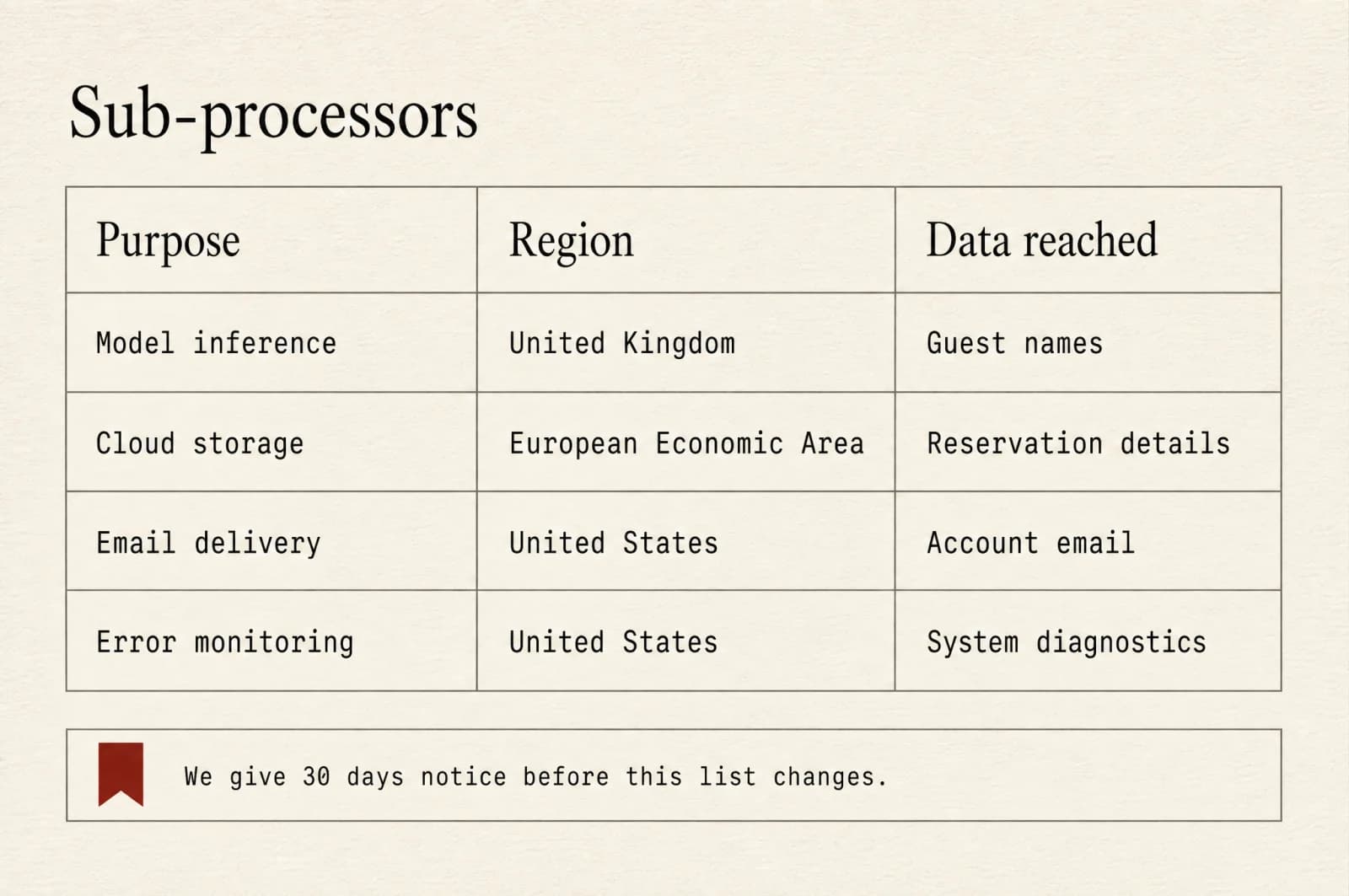
- Sub-processors
- Named individually with the region they operate in and the data they touch. Thirty days notice before that list changes.
Three plans. Nothing metered, nothing to top up.
A free plan that previews but does not export, one plan for a single wedding, and one for people running events back to back. Monthly or yearly, in USD.
All prices are in United States dollars (USD) and are charged in USD. There is one currency on this site and no currency conversion at checkout.
Free
No card details required.
Enough to see whether the tool sets your names the way you need them set.
- 20 card previews, watermarked
- 1 event
- Guest list up to 30 people
- Name flagging and the confirmation step
- Seating arrangements with broken constraints shown
- No file export
- No video
- No print-ready output
Table
Most chosen for one weddingBilled monthly, renews until cancelled.
For one wedding, where the cards have to go to a printer and come back right.
- 200 card faces
- 3 events
- Guest list up to 250 people
- Print-ready export: PDF and PNG
- Seating plan and floor plan artwork
- Font licence list included with every export
- No video export
Venue
Billed monthly, renews until cancelled.
For planners and venues running events back to back, with their own data terms.
- Unlimited card faces
- Unlimited events
- No guest list limit
- Every export format, including SVG vector and CMYK PDF
- Entrance guide video export
- Priority render queue
- Negotiated DPA terms
What is not sold here
No credit packs, no top-ups, no one-off purchases and no pay-per-card. Allowances belong to the period you paid for and do not roll over.
Cancelling
Cancel any time from your account. Everything keeps working until the end of the period you have paid for, then your lists follow the retention setting you chose.
Nothing physical
This is a subscription to software. We produce files. We do not print, cut, pack or ship anything, and we do not take a commission from anyone who does.
Start with the list you already have.
Paste up to thirty guests on the free plan and see which of them the tool would come back and ask you about. No card details, no export, no obligation to go further.